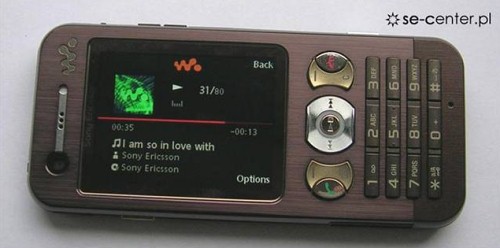
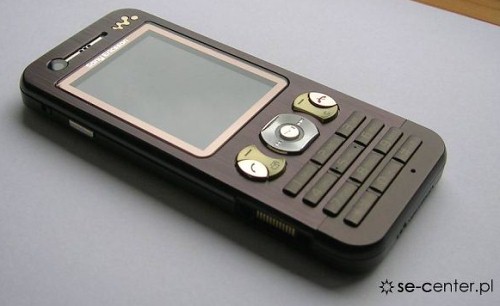
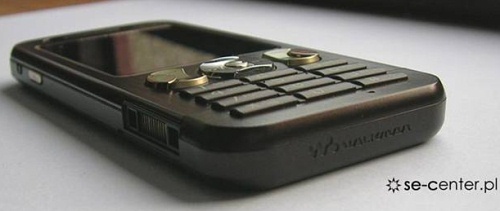
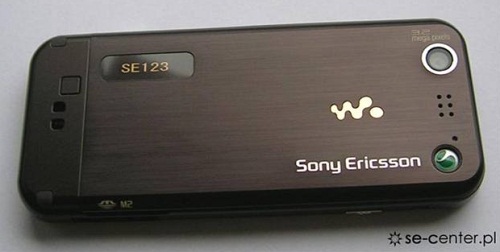
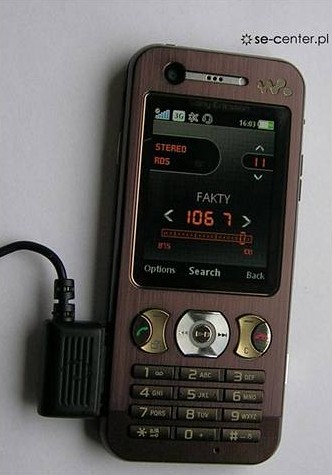
The SE-center.pl has posted more live pics of Sony Ericsson W890 phone, which is not yet officially introduced. This is a Walkman series product following the W880. According to the source, the W890 comes with a 2” QVGA display, a 3.2-megapixel camera and a frontal camera for video calls (3G support), Bluetooth (A2DP) wireless module and an FM-radio with RDS. There is the support of Memory Stick Micro (M2) cards. These are non-official details, not yet confirmed by the vendor....sources mobilereview
Live pics of Sony Ericsson W890
The SE-center.pl has posted more live pics of Sony Ericsson W890 phone, which is not yet officially introduced. This is a Walkman series product following the W880. According to the source, the W890 comes with a 2” QVGA display, a 3.2-megapixel camera and a frontal camera for video calls (3G support), Bluetooth (A2DP) wireless module and an FM-radio with RDS. There is the support of Memory Stick Micro (M2) cards. These are non-official details, not yet confirmed by the vendor....sources mobilereview
Convert a 512 mb duo/produo/mmc card into 640 mb
CONVERT A 512 MB duo/produo CARD TO 640 MB
DO YOU GUYS WANT TO CONVERT A 512 MB duo/produo/MMC CARD TO 640 MB AT NO COST AT ALL.THEN READ ON...
I guess it works for duo/produo/mmc cards.
Your files in duo/produo/MMC is stored in multiple (disk) blocks.
So if you format using 16K block, the space used will be 16K eventhough your file is just 1K.
If you buy DUO/PRO-DUO, it is usually preformatted with 16K block. Therefore a lot of space is wasted as most installed program files are usually less than 2K.
You will need a card reader to do this:-
edit:u can also do it by connecting u r phone via usb
1. Connect card reader and copy all your files in the memory card to computer disk.
(Make sure you set the show all/hidden/os files to "on")
2. Do a format of the memory card using command line "format" and use the /A=size option.
Alternative, you can use the Disk Management in Adminstrative Tools to format.
Make sure you select FAT16. For 256MB memory card, smallest block you can use is 4K, 128MB is 2K, 64Mb is 1K and 32MB is 512B.
(Note: You cannot use the phone "format ext.mem" to do this as the format just clear the allocation table and does not change the block size)
3. Copy back all files to memory card.
Now you will find that you will have more space.
I have installed many software to to my 256MB memory card and it is nearly full. After doing above, I got an "extra" 32MB.
For those who have problem with command line format::
Just use the Disk Managament to format
1. Goto Start->control Panel->Administrative Tools->Computer management->Disk management
2. Select your memory card/usb drive. Right-click and select "Format"
3. Select "FAT". Choose Allocation size. For 256Mb MMC select 4K, 128Mb MMC select 2K, 64Mb MMC select 1K and 32Mb MMC select 512B
المزيد
DO YOU GUYS WANT TO CONVERT A 512 MB duo/produo/MMC CARD TO 640 MB AT NO COST AT ALL.THEN READ ON...
I guess it works for duo/produo/mmc cards.
Your files in duo/produo/MMC is stored in multiple (disk) blocks.
So if you format using 16K block, the space used will be 16K eventhough your file is just 1K.
If you buy DUO/PRO-DUO, it is usually preformatted with 16K block. Therefore a lot of space is wasted as most installed program files are usually less than 2K.
You will need a card reader to do this:-
edit:u can also do it by connecting u r phone via usb
1. Connect card reader and copy all your files in the memory card to computer disk.
(Make sure you set the show all/hidden/os files to "on")
2. Do a format of the memory card using command line "format" and use the /A=size option.
Alternative, you can use the Disk Management in Adminstrative Tools to format.
Make sure you select FAT16. For 256MB memory card, smallest block you can use is 4K, 128MB is 2K, 64Mb is 1K and 32MB is 512B.
(Note: You cannot use the phone "format ext.mem" to do this as the format just clear the allocation table and does not change the block size)
3. Copy back all files to memory card.
Now you will find that you will have more space.
I have installed many software to to my 256MB memory card and it is nearly full. After doing above, I got an "extra" 32MB.
For those who have problem with command line format::
Just use the Disk Managament to format
1. Goto Start->control Panel->Administrative Tools->Computer management->Disk management
2. Select your memory card/usb drive. Right-click and select "Format"
3. Select "FAT". Choose Allocation size. For 256Mb MMC select 4K, 128Mb MMC select 2K, 64Mb MMC select 1K and 32Mb MMC select 512B
Convert a 512 mb duo/produo/mmc card into 640 mb
CONVERT A 512 MB duo/produo CARD TO 640 MB
DO YOU GUYS WANT TO CONVERT A 512 MB duo/produo/MMC CARD TO 640 MB AT NO COST AT ALL.THEN READ ON...
I guess it works for duo/produo/mmc cards.
Your files in duo/produo/MMC is stored in multiple (disk) blocks.
So if you format using 16K block, the space used will be 16K eventhough your file is just 1K.
If you buy DUO/PRO-DUO, it is usually preformatted with 16K block. Therefore a lot of space is wasted as most installed program files are usually less than 2K.
You will need a card reader to do this:-
edit:u can also do it by connecting u r phone via usb
1. Connect card reader and copy all your files in the memory card to computer disk.
(Make sure you set the show all/hidden/os files to "on")
2. Do a format of the memory card using command line "format" and use the /A=size option.
Alternative, you can use the Disk Management in Adminstrative Tools to format.
Make sure you select FAT16. For 256MB memory card, smallest block you can use is 4K, 128MB is 2K, 64Mb is 1K and 32MB is 512B.
(Note: You cannot use the phone "format ext.mem" to do this as the format just clear the allocation table and does not change the block size)
3. Copy back all files to memory card.
Now you will find that you will have more space.
I have installed many software to to my 256MB memory card and it is nearly full. After doing above, I got an "extra" 32MB.
For those who have problem with command line format::
Just use the Disk Managament to format
1. Goto Start->control Panel->Administrative Tools->Computer management->Disk management
2. Select your memory card/usb drive. Right-click and select "Format"
3. Select "FAT". Choose Allocation size. For 256Mb MMC select 4K, 128Mb MMC select 2K, 64Mb MMC select 1K and 32Mb MMC select 512B
المزيد
DO YOU GUYS WANT TO CONVERT A 512 MB duo/produo/MMC CARD TO 640 MB AT NO COST AT ALL.THEN READ ON...
I guess it works for duo/produo/mmc cards.
Your files in duo/produo/MMC is stored in multiple (disk) blocks.
So if you format using 16K block, the space used will be 16K eventhough your file is just 1K.
If you buy DUO/PRO-DUO, it is usually preformatted with 16K block. Therefore a lot of space is wasted as most installed program files are usually less than 2K.
You will need a card reader to do this:-
edit:u can also do it by connecting u r phone via usb
1. Connect card reader and copy all your files in the memory card to computer disk.
(Make sure you set the show all/hidden/os files to "on")
2. Do a format of the memory card using command line "format" and use the /A=size option.
Alternative, you can use the Disk Management in Adminstrative Tools to format.
Make sure you select FAT16. For 256MB memory card, smallest block you can use is 4K, 128MB is 2K, 64Mb is 1K and 32MB is 512B.
(Note: You cannot use the phone "format ext.mem" to do this as the format just clear the allocation table and does not change the block size)
3. Copy back all files to memory card.
Now you will find that you will have more space.
I have installed many software to to my 256MB memory card and it is nearly full. After doing above, I got an "extra" 32MB.
For those who have problem with command line format::
Just use the Disk Managament to format
1. Goto Start->control Panel->Administrative Tools->Computer management->Disk management
2. Select your memory card/usb drive. Right-click and select "Format"
3. Select "FAT". Choose Allocation size. For 256Mb MMC select 4K, 128Mb MMC select 2K, 64Mb MMC select 1K and 32Mb MMC select 512B
Tips & Tricks for Symbians!
Tip 1 : Do u know how to use the edit button (abc or pencil button)?
Heres how... in the inbox for example; u wanna delete multiple sms, simply hold the edit button, scroll down, and then, press c to delete the marked sms. The edit button can also b used to copy and past text in sms, simply hold it and scroll across, choose copy. pretty good for placing song names in ngages
Tip 2 : Shit happens, on a smartphone, its inevitable u do something wrong, and tis calls for a format of fone. to format the fone, press *#7370#, then enter the lock code, which is the sec code of the fone. NOTE: batt must b full, else if format is disrupted by low batt, consequences will b disatrous
I heard the code *#7780# works too, pretty much the same i tink.
for 6600 users, to format the fone, theres an alternative way. Press and hold <3>, <*> and Call (Send) buttons, then power on fone, keep holding on the 3 buttons, till u come to a format screen. this method ONLY works on 6600, and need not enter the sec code. BUT sec code would be reset to default 12345.
Tip 3 : TO NGAGE USERS; Did u know u can install .sis files simply using the cable given? Juz plug it in, place the .sis file anywhere on e: (the mmc), not in any folders, root of e:, disconnect, then look for it in manager.
[hide]Tip 4: Save on battery and system memory being used by regulary checking the task manager which can be accessed by holding down the menu button!!
Tip 5: Type *#06# to display your IMEI serial number, very valuable for the unlocking your phone to other sim cards
Tip 6: Type *#0000# to view which firmware version you are running
Tip 4a: Set the screen saver to a short time out period to prolong battery life.
Tip 4b: Avoid restarting the phone, or repeatedly turning it on and off. This helps increase battery life.
Tip 7: If you would like to avoid being "blue jacked", keep bluetooth turned off, or set your phone's visibility to hidden.
Tip 8: Don't want to carry a watch and a phone? Set the screen saver to show date and time, then you can ditch the watch.
Tip 9: Save memory when installing apps, by installing over bluetooth. This can be done using the nokia phone suite and a bluetooth serial connection. Only works with .SIS files, so java still has to be sent to the phone, but will save space when using .SIS files.
Tip 10: Operator logos
Use a filemanager like FExplorer or SeleQ to add the folders: "c:/system/Apps/phone/oplogo". Add a .bmp picture to folder "oplogo" and restart your phone! The .bmp picture size needs to be: 97 x 25 pixels
Tip 11: Check if the recepients phone is on
Delivery reports
or
Type *0# your message in the message composer window space then write your message, the recipient will not see the star zero hash bit - just the message When they read it it will relay a message back to your fone showing the time they recieved it. (haven't yet tried it myself though)
Tip 12: BlueJacking
First up, you need to know what Bluetooth is. There are lots of types of modern devices that incorporate Bluetooth as one of their many features. PDAs, mobile phones and laptops are a few of these modern devices. Bluetooth means that Bluetooth enabled devices can send things like phonebook/address book contacts, pictures & notes to other Bluetooth enabled devices wirelessly over a range of about 10 metres. So, we've got past the boring part. Now, using a phone with Bluetooth, you can create a phonebook contact and write a message, eg. 'Hello, you've been bluejacked', in the 'Name' field. Then you can search for other phones with Bluetooth and send that phonebook contact to them. On their phone, a message will popup saying "'Hello, you've been bluejacked' has just been received by Bluetooth" or something along those lines. For most 'victims' they will have no idea as to how the message appeared on their phone.
Tip 13: While you are viewing a picture in your phone's gallery, press one of these shortcut keys (definitely works on 6600, not sure about other symbians)
1 - turn image anticlockwise
3 - turn image clockwise
* - toggle on/off of full screen
5 - zoom in
0 - zoom out
#15 u can select all files in a folder by selecting THE folder and copy it then paste it somewhere. however u need to make a new directory. fexplorer wun let u copy that folder together. well seleQ can mark files to copy but it really takes time!
#16: A soft and Hard reset
A Soft-reset - the process of resetting all the settings of the phone to the factory default! No applications are deleted! A Hard-reset is like formatting a drive! It does format the memory. Everything that has been installed after the first use of the phone is deleted! It will recover the memory of the phone to the state you purchased it! It is done by inputing the following code: *#7370# NOTE: The battery must be full or the charger has to be connected to the phone so that it does not run out of power and make the phone unusable.
#17: Formats of images
supported ones: JPG UPF GIF87a/89a WBMB MBM TIFF/F PNG EXIF
How to copy & paste text in your Nokia 3650:
Press and hold the pencil key and select your text using the scroll key.
Left function key will change to 'Copy'. Press it to copy the selected text to clipboard.
You can paste the clipboard contents the same way:
press and hold the pencil key and press 'Paste'. Or, press pencil key once and select 'Paste'.
Press and hold the Menu key to open the application switching window, where you can *duh* switch between applications.
If a program hangs and you can't shut it down, select the application in the
application switching window and press 'C' to kill it. It's also a faster way to exit programs.
Turn on/off the "click" sound made by the camera by selecting the 'Silent' profile or by turning warning tones on/off:
Menu > Profiles > "select your activated profile" > Personalise > Warning tones > On/Off.
(This also effects the sound of Java games and apps).
To change background image go to:
Menu > Tools > Settings > Phone > Standby mode > Background image > Yes > "choose an image".
The best size for background images is 174x132 pixels.
Only got blue, green and purple in your 3650 colour palette?
This free app adds 3 more colours: Palette Extender.
Display an image when someone's calling:
Menu > Contacts > "select a contact card" > Options > Edit > Options > Add thumbnail > "choose an image".
Add a personal ringing tone to a contact:
Menu > Contacts > "select a contact card" > Options > Open > Options > Ringing tone > "choose a ringing tone".
Delete all messages from your Inbox at once:
Menu > Messaging > Inbox > Options > Mark/Unmark > Mark all > Options > Delete.
Send or hide your caller ID: Go to: Menu > Tools > Settings > Call > Send My
Caller ID > 'Yes', 'No' or 'Set By Network' to follow the default settings of your home network.
If you often copy large files to your MultiMedia Card, I recommend a card reader.
E.g. With a card reader it takes only 12 seconds to copy a 10 MB file!
Record the sound of a phone call using the (sound) Recorder.
Menu > Extra's > Recorder > Options > Record sound clip.
Note: short beeps are audible during call registration.
But there is a 60 second limitation so if you want unlimited sound recording get this app: Extended Recorder.
While writing text, press "#" to switch between upper and lower case and Dictonary on/off (predictive text input).
Press and hold "#" to switch between Alpha mode and Number mode.
Keyboard shortcuts for zooming and rotating images in Images:
1 = zoom in, 0 = zoom out, press and hold to return to the normal view.
2 = rotate anticlockwise, 9 = rotate clockwise, * = full screen.
In standby mode, press and hold the right soft key to activate voice dialling.
To add a voice tag to a phone number, open a contact card and scroll to the phone number and select:
Options > Add voice tag.
You can customize both soft keys located below the screen (in standby mode):
Menu > Tools > Settings > Phone > Standby mode > Left/Right selection key > "select an application".
In standby mode. press scroll key center (joystick) to go directly to Contacts.
In standby mode, press and hold 0 to launch your wap home page.
In Menu or any subfolder, press numbers 1 - 9 to start the application at that location.
123
456
789
In standby mode,
45# + dials the number on your sim in memory slot 45.
50# + dials slot 50 and so on.
If you have your keylock activated just press the on/off button to turn on your backlight
to look at the time when it's dark without having to unlock the keypad.
Never, ever, in your whole life, install WildSkinz on your Nokia 3650!!! WildSkinz screws up
the whole 3650 system. It was never intended to work on the 3650, only on the 7650.
Why assigning Video Recorder in the right or left soft key does not work?
(Sound Recorder is launched instead of Video Recorder)
It's a bug with firmware version 2.50.
How to check your firmware version:
A "Firmware" is the phone's operating system stored in internal Flash memory of the device (disk Z.
Manufacturers release new firmware versions containing bug fixes, improvements and - sometimes - offering new functions.
Firmware upgrade can only be made in authorized Nokia service centre (point).
To check your current firmware version simply type *#0000# on main Phone screen.
�
How to check your IMEI (International Mobile Equipment Identity)?
Type *#06# on main Phone screen.
Start up in Safe Mode so no 'auto start' apps will be running:
To make sure that no memory-resident programs start when you reboot your phone,
hold down the pencil key when you turn on the phone and hold it on untill you have to enter your PIN code.
(When you have trouble booting up the phone with the MMC in it because it got corrupted for some reason, this trick will
almost always let you boot up the phone so you can remove the latest installed app which might have caused the
problem or if your phone is "unrepairable" you can still back up your important data before you do a format.)
Q: How to totally format your Nokia 3650 and remove all installed applications, user files and restore all
settings to default like it's new out of the box? (OEM apps won't be deleted like Camera and RealOne Player).
A: First Format your MMC: Menu > Extras > Memory > Options > Format mem. card > Yes.
Note: It is very important to format your MMC before you format your phone!
Then format your phone by typing *#7370# on main Phone screen.
Phone will ask: "Restore all original phone settings? Phone will restart." Press 'Yes' and enter your Lock code (default is 12345).
Tip: Formatting takes several minutes so you'd better connect your Nokia 3650
to a charger to ensure that your battery doesn't get empty in the middle of formatting.
Note: All your created acces points and mailboxes will be lost so take a note of them. And all application settings will be reset.
E.g. In Camera, image quality is set back to normal and memory in use is set back to phone memory. And also in Messages,
memory in use is set back to phone memory, etc. Also backup your contacts with PC Suite or a program like Contacts Manager.
To reset your wallet, should you forget your code,
Type in:
*#7370925538#
this will reset the wallet code, the wallet contents will be deleted
المزيد
Tip 1 : Do u know how to use the edit button (abc or pencil button)?
Heres how... in the inbox for example; u wanna delete multiple sms, simply hold the edit button, scroll down, and then, press c to delete the marked sms. The edit button can also b used to copy and past text in sms, simply hold it and scroll across, choose copy. pretty good for placing song names in ngages
Tip 2 : Shit happens, on a smartphone, its inevitable u do something wrong, and tis calls for a format of fone. to format the fone, press *#7370#, then enter the lock code, which is the sec code of the fone. NOTE: batt must b full, else if format is disrupted by low batt, consequences will b disatrous
I heard the code *#7780# works too, pretty much the same i tink.
for 6600 users, to format the fone, theres an alternative way. Press and hold <3>, <*> and Call (Send) buttons, then power on fone, keep holding on the 3 buttons, till u come to a format screen. this method ONLY works on 6600, and need not enter the sec code. BUT sec code would be reset to default 12345.
Tip 3 : TO NGAGE USERS; Did u know u can install .sis files simply using the cable given? Juz plug it in, place the .sis file anywhere on e: (the mmc), not in any folders, root of e:, disconnect, then look for it in manager.
[hide]Tip 4: Save on battery and system memory being used by regulary checking the task manager which can be accessed by holding down the menu button!!
Tip 5: Type *#06# to display your IMEI serial number, very valuable for the unlocking your phone to other sim cards
Tip 6: Type *#0000# to view which firmware version you are running
Tip 4a: Set the screen saver to a short time out period to prolong battery life.
Tip 4b: Avoid restarting the phone, or repeatedly turning it on and off. This helps increase battery life.
Tip 7: If you would like to avoid being "blue jacked", keep bluetooth turned off, or set your phone's visibility to hidden.
Tip 8: Don't want to carry a watch and a phone? Set the screen saver to show date and time, then you can ditch the watch.
Tip 9: Save memory when installing apps, by installing over bluetooth. This can be done using the nokia phone suite and a bluetooth serial connection. Only works with .SIS files, so java still has to be sent to the phone, but will save space when using .SIS files.
Tip 10: Operator logos
Use a filemanager like FExplorer or SeleQ to add the folders: "c:/system/Apps/phone/oplogo". Add a .bmp picture to folder "oplogo" and restart your phone! The .bmp picture size needs to be: 97 x 25 pixels
Tip 11: Check if the recepients phone is on
Delivery reports
or
Type *0# your message in the message composer window space then write your message, the recipient will not see the star zero hash bit - just the message When they read it it will relay a message back to your fone showing the time they recieved it. (haven't yet tried it myself though)
Tip 12: BlueJacking
First up, you need to know what Bluetooth is. There are lots of types of modern devices that incorporate Bluetooth as one of their many features. PDAs, mobile phones and laptops are a few of these modern devices. Bluetooth means that Bluetooth enabled devices can send things like phonebook/address book contacts, pictures & notes to other Bluetooth enabled devices wirelessly over a range of about 10 metres. So, we've got past the boring part. Now, using a phone with Bluetooth, you can create a phonebook contact and write a message, eg. 'Hello, you've been bluejacked', in the 'Name' field. Then you can search for other phones with Bluetooth and send that phonebook contact to them. On their phone, a message will popup saying "'Hello, you've been bluejacked' has just been received by Bluetooth" or something along those lines. For most 'victims' they will have no idea as to how the message appeared on their phone.
Tip 13: While you are viewing a picture in your phone's gallery, press one of these shortcut keys (definitely works on 6600, not sure about other symbians)
1 - turn image anticlockwise
3 - turn image clockwise
* - toggle on/off of full screen
5 - zoom in
0 - zoom out
#15 u can select all files in a folder by selecting THE folder and copy it then paste it somewhere. however u need to make a new directory. fexplorer wun let u copy that folder together. well seleQ can mark files to copy but it really takes time!
#16: A soft and Hard reset
A Soft-reset - the process of resetting all the settings of the phone to the factory default! No applications are deleted! A Hard-reset is like formatting a drive! It does format the memory. Everything that has been installed after the first use of the phone is deleted! It will recover the memory of the phone to the state you purchased it! It is done by inputing the following code: *#7370# NOTE: The battery must be full or the charger has to be connected to the phone so that it does not run out of power and make the phone unusable.
#17: Formats of images
supported ones: JPG UPF GIF87a/89a WBMB MBM TIFF/F PNG EXIF
How to copy & paste text in your Nokia 3650:
Press and hold the pencil key and select your text using the scroll key.
Left function key will change to 'Copy'. Press it to copy the selected text to clipboard.
You can paste the clipboard contents the same way:
press and hold the pencil key and press 'Paste'. Or, press pencil key once and select 'Paste'.
Press and hold the Menu key to open the application switching window, where you can *duh* switch between applications.
If a program hangs and you can't shut it down, select the application in the
application switching window and press 'C' to kill it. It's also a faster way to exit programs.
Turn on/off the "click" sound made by the camera by selecting the 'Silent' profile or by turning warning tones on/off:
Menu > Profiles > "select your activated profile" > Personalise > Warning tones > On/Off.
(This also effects the sound of Java games and apps).
To change background image go to:
Menu > Tools > Settings > Phone > Standby mode > Background image > Yes > "choose an image".
The best size for background images is 174x132 pixels.
Only got blue, green and purple in your 3650 colour palette?
This free app adds 3 more colours: Palette Extender.
Display an image when someone's calling:
Menu > Contacts > "select a contact card" > Options > Edit > Options > Add thumbnail > "choose an image".
Add a personal ringing tone to a contact:
Menu > Contacts > "select a contact card" > Options > Open > Options > Ringing tone > "choose a ringing tone".
Delete all messages from your Inbox at once:
Menu > Messaging > Inbox > Options > Mark/Unmark > Mark all > Options > Delete.
Send or hide your caller ID: Go to: Menu > Tools > Settings > Call > Send My
Caller ID > 'Yes', 'No' or 'Set By Network' to follow the default settings of your home network.
If you often copy large files to your MultiMedia Card, I recommend a card reader.
E.g. With a card reader it takes only 12 seconds to copy a 10 MB file!
Record the sound of a phone call using the (sound) Recorder.
Menu > Extra's > Recorder > Options > Record sound clip.
Note: short beeps are audible during call registration.
But there is a 60 second limitation so if you want unlimited sound recording get this app: Extended Recorder.
While writing text, press "#" to switch between upper and lower case and Dictonary on/off (predictive text input).
Press and hold "#" to switch between Alpha mode and Number mode.
Keyboard shortcuts for zooming and rotating images in Images:
1 = zoom in, 0 = zoom out, press and hold to return to the normal view.
2 = rotate anticlockwise, 9 = rotate clockwise, * = full screen.
In standby mode, press and hold the right soft key to activate voice dialling.
To add a voice tag to a phone number, open a contact card and scroll to the phone number and select:
Options > Add voice tag.
You can customize both soft keys located below the screen (in standby mode):
Menu > Tools > Settings > Phone > Standby mode > Left/Right selection key > "select an application".
In standby mode. press scroll key center (joystick) to go directly to Contacts.
In standby mode, press and hold 0 to launch your wap home page.
In Menu or any subfolder, press numbers 1 - 9 to start the application at that location.
123
456
789
In standby mode,
45# + dials the number on your sim in memory slot 45.
50# + dials slot 50 and so on.
If you have your keylock activated just press the on/off button to turn on your backlight
to look at the time when it's dark without having to unlock the keypad.
Never, ever, in your whole life, install WildSkinz on your Nokia 3650!!! WildSkinz screws up
the whole 3650 system. It was never intended to work on the 3650, only on the 7650.
Why assigning Video Recorder in the right or left soft key does not work?
(Sound Recorder is launched instead of Video Recorder)
It's a bug with firmware version 2.50.
How to check your firmware version:
A "Firmware" is the phone's operating system stored in internal Flash memory of the device (disk Z.
Manufacturers release new firmware versions containing bug fixes, improvements and - sometimes - offering new functions.
Firmware upgrade can only be made in authorized Nokia service centre (point).
To check your current firmware version simply type *#0000# on main Phone screen.
�
How to check your IMEI (International Mobile Equipment Identity)?
Type *#06# on main Phone screen.
Start up in Safe Mode so no 'auto start' apps will be running:
To make sure that no memory-resident programs start when you reboot your phone,
hold down the pencil key when you turn on the phone and hold it on untill you have to enter your PIN code.
(When you have trouble booting up the phone with the MMC in it because it got corrupted for some reason, this trick will
almost always let you boot up the phone so you can remove the latest installed app which might have caused the
problem or if your phone is "unrepairable" you can still back up your important data before you do a format.)
Q: How to totally format your Nokia 3650 and remove all installed applications, user files and restore all
settings to default like it's new out of the box? (OEM apps won't be deleted like Camera and RealOne Player).
A: First Format your MMC: Menu > Extras > Memory > Options > Format mem. card > Yes.
Note: It is very important to format your MMC before you format your phone!
Then format your phone by typing *#7370# on main Phone screen.
Phone will ask: "Restore all original phone settings? Phone will restart." Press 'Yes' and enter your Lock code (default is 12345).
Tip: Formatting takes several minutes so you'd better connect your Nokia 3650
to a charger to ensure that your battery doesn't get empty in the middle of formatting.
Note: All your created acces points and mailboxes will be lost so take a note of them. And all application settings will be reset.
E.g. In Camera, image quality is set back to normal and memory in use is set back to phone memory. And also in Messages,
memory in use is set back to phone memory, etc. Also backup your contacts with PC Suite or a program like Contacts Manager.
To reset your wallet, should you forget your code,
Type in:
*#7370925538#
this will reset the wallet code, the wallet contents will be deleted
Nokia Ultimate Secret Codes
*# 06 # Seriennummer/IMEI indicates (actually also a GSM is code - see further below)
-----------------------------------------------------
*# 0000 # SW version announcements (e.g. V3.42.1, 16-10-03, Nhl-10)
---------------------------------------------------------
*# 2820 # Bluetooth (BT) device address indicate
------------------------------------------------------------
xx # Directory quick access (xx = storage location and afterwards lozenge e.g. 24 #)
---------------------------------------------------
[hide]A/from key Short pressing for menu for switching between profiles
------------------------------------------------------------ -------
Menu key Long pressing for "task manager" - switching between active programs (with "C" key programs can be terminated.)
------------------------------------------------------------ ------
Menu quick access Over in the menu e.g. to point 3.1 arrive simply 31 enter (if the third symbol a file is opened is for these and then in it started the first Programm/Icon).
------------------------------------------------------------ ---------
Autostart go around When switching on of the Handys on to the pin inquiry the key "ABC" (pin) comes the whole time keeps pressed - this is to ignore (allegedly) the autoinitialization programs.
------------------------------------------------------------ ------------
# Do not switch between different lines (AS)... goes e.g. with Austrian ONE Handys (see nose cunning). I could not try out however also, since I did not have 2 lines on the SIM map.
------------------------------------------------------------ -------------
12345 ... is according to standard set the Nokia nokia-Sicherheitscode.
------------------------------------------------------------ --------
0000 ... is according to standard those (with Vodafone windshield frame section) set 2te pin and that standard net code/password
With D1 the standard net code is the last 4 numbers of the card number without HLR e.g. 99999234-5/55 - > 2345
------------------------------------------------------------ ------------
0 - for a long time press If one the "0" in the main menue for a long time presses those homepage of the standard WAP connection is called.
------------------------------------------------------
Caution - starting from here the codes are "dangerous"
*#7370925538#
* # of res wallet # ... is to be deleted the code around the "wallet"! Input like normal telephone number (not in wallet code inquiry windows).
NOTE! Afterwards the "wallet" is empty, can again be put on however with new code.
------------------------------------------------------------ -----
*# 7780 # The "original attitudes" and telephone re-establishes is again started (an appropriate inquiry and it follow before must the sicherheitscode be entered).
NOTE! Afterwards various "attitudes" are away - among other things these:
·1 Points of entrance (Provider dependent points of entrance and attitudes)
·2 Bluetooth attitudes
·3 Favorite
·4 Allocation of the two keys (beside Navi keys) in the main menue
·5 Profiles are "neglected" (as with distribution) - still there however new bell tones, etc. are...
·6 SMS/MMS/E Mail attitudes
·7 Logos and spielstaende (allegedly) also deleted...
Programs, calendars and contacts, etc. not changed...
Also the sicherheitscode remains.
This putting back goes also via menu under "attitudes - general - original telephone once.".
------------------------------------------------------------ -------------
*# 7370 # Soft format: If the Handy (only telephone memory) formats, puts back the attitudes (see * to # 7780 #) and implements a software RESET. (however still another inquiry comes before.)
NOTE! If the Akku to 75% are loaded at least, Akku do not only accomplish during the procedure under any circumstances remove! The procedure takes some minutes (approx. 3-4), is absolutely waiting!
This is "only" a soft format... Hard format with "green, 3, *"... see below.
------------------------------------------------------------ --------
Green, * 3 Hard format: If the Handy (only telephone memory) formats, puts back the attitudes (see * to # 7780 #) and implements a RESET.
NOTE! If the Akku to 75% are loaded at least, Akku do not only accomplish during the procedure under any circumstances remove! The procedure takes some minutes (approx. 3-4), is absolutely waiting!
Proceeding: Equipment switch off, which keep "green key" (take off) at the same time pressed, "*" and to "3" key and switch the equipment on (the keys thereby keep further pressed)... to "Formatting" on the display appears...
If that does not function, then equipment for 1 hour switch off, Akku so for a long time rausnehmen and again try.
"only" virtual the memory is generally cleared - genuine formatting can take place only in a Nokia service center, if the Fash is deleted there and/or new L.G. is installed.
---------------------------------------------------------
Mixed * # 92702689 #, then switch - system menu off (goes with me not)
The following code do not fold (with me also):
* EFR0 # (* 3370 #) EFR activate (EFR = Enhanced Full rate Coding - language optimization)
# EFR0 # (# 3370 #) EFR switch off
* HRC # (* 4720 #) HRC switch on (HRC = helped rate Coding - language compression)
# HRC0 # (# 4720 #) HRC switch off
------------------------------------------------------------ ----
SIM LOCK Simlock status query: (use "*" the key over "p,w" and "+" indications to enter)
# pw+ 1234567890 +1 # Provider LOCK status
# pw+ 1234567890 +2 # network LOCK status
# pw+ 1234567890 +3 # Country LOCK status
# pw+ 1234567890 +4 # Sim Card LOCK status
The code 1234567890 must be computed with a program e.g. SmartDCT4Calc and/or DCT 4 code Calculator from IMEI, etc....
Info. to Simlock: SIM LOCK makes it for the offerer/network carriers possible, subsidized (verguenstigte) Handys to offer. Thus one makes oneself if necessary punishable if one SIM LOCK deactivated - in addition the warranty can purged. I take over for it no adhesion or responsibility!
------------------------------------------------------------ ------------
GSM code ... should function at each Handy - however Netz(betreiber)abhaengig are... and "harmless"...
Generally applies: First enter code, "send" afterwards (< send green key > press) and one moment wait...
------------------------------------------------------------ ------
SMS Tipps To Tipps & cheat about SMS (with appropriate codes) are immediately in the FAQ list .
For example for the topic: SMS "retard" and/or deferred send, acknowledgment of receipt, reports...
------------------------------------------------------------ ----
Mark more simply To Tipps & cheat to the topic "mark" e.g. with SMS entrance.
Over simply to mark simply the "pin" (ABC key) hold some e.g. SMS and move then Jostick downward.
--------------------------------------------------------
Call number transmission * 31 # - { CLIR - Calling LINE identification Restriction switches on for the general call number transmission }
# 31 # - switch off the general call number transmission
# 31 # [ telephone number ] - with the next call suppress the own call number (thus temporary)
* 31 # [ telephone number ] - with the next call transfer own call number (thus temporary)
* # 31 # - status query (of call number transmission)
# 31 * [ telephone number ] - own call number show, although receiving station switched call number suppression on. (is not usually de-energised of the Netz(betreiber).)
* 30 # - switch { TIE-clip - Calling LINE identification presentation for the announcement on of the call number of the caller }
# 30 # - switch off
* # 30 # - status query
This also partly goes with 6600 via Men: Attitudes - calls - own No. send...
The following codes are not supported by most Netz(betreibern):
* # 76 # - announcement of the call number, under which one reached the calling (not its call number during rufumleitung!) { COLP - COonnected LINE identification presentation }
* 76 # - switch on
# 76 # - switch off
* # 77 # - announcement of the call number, under which the caller reached me (not my call number during rufumleitung meinerseits!) { COLR - COnnected LINE identification Restriction }
* 77 # - switch on
# 76 # - switch off
------------------------------------------------------------ ------------
Call bypasses (call Forwarding) Bypass code (U):
U=21 always
U=61 retards
U=62 not attainable
U=67 occupies
U=61, 62, 67 can be parallel active
U=21 - > and then no more call signaling overwrites U=61,62 and 67!
Service code (D):
Not all nets support all services
D=10 language and fax (all calls)
D=11 only language
D=12 all data (speed/minutes)
D=13 only fax
D=14 DATEX j (active?)
D=15 teletex (active?)
D=16 only SMS
D=18 all data except SMS
D=19 all services except SMS
D=20 all services
D=21 all asynchronous services
D=22 all synchronous services
D=23 3.1 kHz GSM of language services
D=24 all synchronous POINT ton of POINT DATA inclusive. PADs
D=25 only data (all asynchronous POINT ton of POINT DATA inclusive. PADs)
D=26 DATA pack exchange on the left of inclusive. PADs
D=27 services thru PADs
D=29 12 Kbps digitally left
** U * [ goal call number ] * D # - bypass switch on
Input without * D means bypass of all services
Call bypasses (call Forwarding)
01.01.04 Bypass code (U):
U=21 always
U=61 retards
U=62 not attainable
U=67 occupies
U=61, 62, 67 can be parallel active
U=21 - > and then no more call signaling overwrites U=61,62 and 67!
Service code (D):
Not all nets support all services
D=10 language and fax (all calls)
D=11 only language
D=12 all data (speed/minutes)
D=13 only fax
D=14 DATEX j (active?)
D=15 teletex (active?)
D=16 only SMS
D=18 all data except SMS
D=19 all services except SMS
D=20 all services
D=21 all asynchronous services
D=22 all synchronous services
D=23 3.1 kHz GSM of language services
D=24 all synchronous POINT ton of POINT DATA inclusive. PADs
D=25 only data (all asynchronous POINT ton of POINT DATA inclusive. PADs)
D=26 DATA pack exchange on the left of inclusive. PADs
D=27 services thru PADs
D=29 12 Kbps digitally left
** U * [ goal call number ] * D # - bypass switch on
Input without * D means bypass of all services
## U ** D # - switch bypass off (individual bypasses and service code)
Without ** D all services are switched off to bypasses
## 002 # (all bypasses for all service codes switch off)
## 004 # (switch off only U=61, 62, 67 and for all service codes - thus ", not attainable, nonacceptance "occupies)
* # U ** D # - status of the bypasses query:
Input without ** D queries all services and bypasses
Bypass in the speaking and/or fax box: Number in bypass procedure with D=11 and/or 13 enter
Goal call number (e.g. D2-Netz: +49,172 xxx) and Handynummer without preselection (if necessary 172 replaces) enter.
Tap: During switched on rufumleitung "with occupied" being able "to reject" calls by one the red key during "to ring" presses. The caller is then passed on to the goal call number of the occupying bypass (e.g. mailbox).
Type for waiting period during rufumleitung 61: ** 61 * [ goal call number ] * 11 * [ time in sec. (5 to 30) ] #
This also partly goes with 6600 via menu: Attitudes - rufumleitungen -...
----------------------------------------------------------
Knock/stops/parks/faults Knocks is signaling a secondary call during a current discussion
* 43 # - switch on
# 43 # - switch off
* # 43 # - status query
This also partly goes with 6600 via menu: Attitudes - calls - knocking...
0 < sends > - reject while the discussion a knocking
1 < send > - discussion terminate, knocking discussion accept
certain discussion (y) terminate 1 (y) < send >
2 < sends > - discussion park, knocking discussion accept
certain discussion and new discussion leads 2 parks (y) < sends >
0 < sends > - caller the busy condition signal
This also partly goes with 6600 via menus existing during the discussion.
----------------------------------------------------
Call barrier Possible only if bypass of the service code is switched off.
Check code (S):
S=33 all outgoing transmissions
S=331 outgoing abroad
S=332 outgoing abroad except home
S=35 all arriving transmissions
S=351 all arriving abroad
Special check codes (s) delete:
Switch off only in connection with the procedure
S=330 check code status outgoing & arriving transmissions switch off
S=333 check code status outgoing transmissions switch off
S=353 check code status arriving transmissions switch off
Service code (D):
Not all nets support all services
D=10 language and fax (all calls)
D=11 only language
D=12 all data (speed/minutes)
D=13 only fax
D=14 DATEX j (active?)
D=15 teletex (active?)
D=16 only SMS
D=18 all data except SMS
D=19 all services except SMS
D=20 all services
D=21 all asynchronous services
D=22 all synchronous services
D=23 3.1 kHz GSM of language services
D=24 all synchronous POINT ton of POINT DATA inclusive. PADs
D=25 only data (all asynchronous POINT ton of POINT DATA inclusive. PADs)
D=26 data packet exchange links incl. PADs
D=27 services thru PADs
D=29 12 Kbps digital link
* S * [Passwort] * D # - einschalten der Anruf-Sperre
# S * [Passwort] * D # - ausschalten der Anruf-Sperre
*# S # - Status der Anruf-Sperre abfragen
Passwort für Handy Sperre ändern:
** 03 ** [altes Passwort] * [neues Passwort] * [neues Passwort wiederholen] #
** 03 * 330 *[altes Passwort] * [neues Passwort] * [neues Passwort wiederholen] #
Dies geht beim 6600 auch teilweise via Menü: Einstellungen - Anrufsperre ...
------------------------------------------------------------ ----
PIN ändern ** 04 * [alte PIN] * [neue PIN] * [neue PIN wiederholen] #
** 042 * [alte PIN 2] * [neue PIN 2] * [neue PIN 2 wiederholen] #
PIN entsperren: ** 05 * [PUK] * [neue PIN] * [neue PIN wiederholen] #
PIN 2 entsperren: ** 052 * [PUK2] * [neue PIN 2] * [neue PIN 2 wiederholen] #
Dies geht beim 6600 auch teilweise via Menü: Einstellungen - Sicherheit - Telefon und SIM
-----------------------------------------------------
Diverse Codes Die folgenden Codes klappen nur in einigen (wenigen) Netzen/Netzbetreibern ... leider z.B. nicht im Vodafone D2 Netz (in Deutschland):
*#100# - Eigene Nummer (Own Number)
*#101# - HLR Nummer
*#102# - Switch Nummer
*#103# - Zeit im Netz (Network Time)
*#104# - Anrufbeantworter Nummer (Voice mailbox number)
*#105# - Switch number
*#147# - Letzter Anrufer (Last Caller)
#646# - Minutes Used: (646 spells 'MIN')
*#1345# or *174# - Vodafone Prepaid balance
*78 - Do not disturb - nur in Nord America in GSM und CDMA Netzen möglich
*79 - Cancel (s.o.)
---------------------------------------------------
CHECK SIM-LOCK
Note - If you bought your Nokia on UK Vodafone or UK Cellnet you do not need to check this because they both transmit on GSM900, and they don't lock the phones. However if you bought your phone on UK Orange or UK One2one your phone may be blocked. The reason is that they both transmitt on GSM1800. To make a call on GSM1800 you need what is known as a "Dual band" phone. A dual band phone is able to transmit on both GSM900 and GSM1800, so they lock the phones so you can't use it with any other network simcard. If you find that your phone is locked you can try different software to unlock it. (we havn't found one that works yet), or you can ask your service provider who will gladly exchange the 10 digit code for about £35.
This is how to check the status of the 4 different locks. Aslo don't try entering the wrong number, because after 3 times it will block the phone for good.
There are 4 different locks on your Nokia phone.
COUNTRY-LOCK
NETWORK-LOCK
PROVIDER-LOCK
SIMCARD-LOCK
The code to read out the sim-lock status of your phone is
#PW+(MASTERCODE)+(Y)#
# = DOUBLE-CROSS
W = PRESS "*" THREE TIMES
P = PRESS "*" FOUR TIMES
+ = PRESS "*" TWO TIMES
MASTERCODE = 1234567890
Y = NUMBER 1 TO
-------------------------------------
THE JAMES BOND TRICK
If you short-circuit theleft middle and right pins on the bottom of the phone with all connections touching each other, the Nokia software hangs! The profile "Headset" will be activated. Before you do this just activate the "Automatic Answer" in the headset profile and set the ringing volume to "Mute". Now you can use your phone for checking out what people are talking about in a room. Just place it under a table in a room and call it. The phone receives the call without ringing and you can listen to what people are saying.
-----------------------------------------------------
Clock Stopping
To check weather your SIM Card supports clock stopping type-
*#746025625# (*#SIM0CLOCK#)
---------------------------------------------
To enter the service menu type-
*#92702689# (*#WAR0ANTY#)
Serial number (IMEI)
Production date (MM/YY)
Purchase date (MM/YY) You can only enter the date once.
Date of last repair (0000=No repair)
Transfer user data to another Nokia phone via Infra-Red
المزيد
-----------------------------------------------------
*# 0000 # SW version announcements (e.g. V3.42.1, 16-10-03, Nhl-10)
---------------------------------------------------------
*# 2820 # Bluetooth (BT) device address indicate
------------------------------------------------------------
xx # Directory quick access (xx = storage location and afterwards lozenge e.g. 24 #)
---------------------------------------------------
[hide]A/from key Short pressing for menu for switching between profiles
------------------------------------------------------------ -------
Menu key Long pressing for "task manager" - switching between active programs (with "C" key programs can be terminated.)
------------------------------------------------------------ ------
Menu quick access Over in the menu e.g. to point 3.1 arrive simply 31 enter (if the third symbol a file is opened is for these and then in it started the first Programm/Icon).
------------------------------------------------------------ ---------
Autostart go around When switching on of the Handys on to the pin inquiry the key "ABC" (pin) comes the whole time keeps pressed - this is to ignore (allegedly) the autoinitialization programs.
------------------------------------------------------------ ------------
# Do not switch between different lines (AS)... goes e.g. with Austrian ONE Handys (see nose cunning). I could not try out however also, since I did not have 2 lines on the SIM map.
------------------------------------------------------------ -------------
12345 ... is according to standard set the Nokia nokia-Sicherheitscode.
------------------------------------------------------------ --------
0000 ... is according to standard those (with Vodafone windshield frame section) set 2te pin and that standard net code/password
With D1 the standard net code is the last 4 numbers of the card number without HLR e.g. 99999234-5/55 - > 2345
------------------------------------------------------------ ------------
0 - for a long time press If one the "0" in the main menue for a long time presses those homepage of the standard WAP connection is called.
------------------------------------------------------
Caution - starting from here the codes are "dangerous"
*#7370925538#
* # of res wallet # ... is to be deleted the code around the "wallet"! Input like normal telephone number (not in wallet code inquiry windows).
NOTE! Afterwards the "wallet" is empty, can again be put on however with new code.
------------------------------------------------------------ -----
*# 7780 # The "original attitudes" and telephone re-establishes is again started (an appropriate inquiry and it follow before must the sicherheitscode be entered).
NOTE! Afterwards various "attitudes" are away - among other things these:
·1 Points of entrance (Provider dependent points of entrance and attitudes)
·2 Bluetooth attitudes
·3 Favorite
·4 Allocation of the two keys (beside Navi keys) in the main menue
·5 Profiles are "neglected" (as with distribution) - still there however new bell tones, etc. are...
·6 SMS/MMS/E Mail attitudes
·7 Logos and spielstaende (allegedly) also deleted...
Programs, calendars and contacts, etc. not changed...
Also the sicherheitscode remains.
This putting back goes also via menu under "attitudes - general - original telephone once.".
------------------------------------------------------------ -------------
*# 7370 # Soft format: If the Handy (only telephone memory) formats, puts back the attitudes (see * to # 7780 #) and implements a software RESET. (however still another inquiry comes before.)
NOTE! If the Akku to 75% are loaded at least, Akku do not only accomplish during the procedure under any circumstances remove! The procedure takes some minutes (approx. 3-4), is absolutely waiting!
This is "only" a soft format... Hard format with "green, 3, *"... see below.
------------------------------------------------------------ --------
Green, * 3 Hard format: If the Handy (only telephone memory) formats, puts back the attitudes (see * to # 7780 #) and implements a RESET.
NOTE! If the Akku to 75% are loaded at least, Akku do not only accomplish during the procedure under any circumstances remove! The procedure takes some minutes (approx. 3-4), is absolutely waiting!
Proceeding: Equipment switch off, which keep "green key" (take off) at the same time pressed, "*" and to "3" key and switch the equipment on (the keys thereby keep further pressed)... to "Formatting" on the display appears...
If that does not function, then equipment for 1 hour switch off, Akku so for a long time rausnehmen and again try.
"only" virtual the memory is generally cleared - genuine formatting can take place only in a Nokia service center, if the Fash is deleted there and/or new L.G. is installed.
---------------------------------------------------------
Mixed * # 92702689 #, then switch - system menu off (goes with me not)
The following code do not fold (with me also):
* EFR0 # (* 3370 #) EFR activate (EFR = Enhanced Full rate Coding - language optimization)
# EFR0 # (# 3370 #) EFR switch off
* HRC # (* 4720 #) HRC switch on (HRC = helped rate Coding - language compression)
# HRC0 # (# 4720 #) HRC switch off
------------------------------------------------------------ ----
SIM LOCK Simlock status query: (use "*" the key over "p,w" and "+" indications to enter)
# pw+ 1234567890 +1 # Provider LOCK status
# pw+ 1234567890 +2 # network LOCK status
# pw+ 1234567890 +3 # Country LOCK status
# pw+ 1234567890 +4 # Sim Card LOCK status
The code 1234567890 must be computed with a program e.g. SmartDCT4Calc and/or DCT 4 code Calculator from IMEI, etc....
Info. to Simlock: SIM LOCK makes it for the offerer/network carriers possible, subsidized (verguenstigte) Handys to offer. Thus one makes oneself if necessary punishable if one SIM LOCK deactivated - in addition the warranty can purged. I take over for it no adhesion or responsibility!
------------------------------------------------------------ ------------
GSM code ... should function at each Handy - however Netz(betreiber)abhaengig are... and "harmless"...
Generally applies: First enter code, "send" afterwards (< send green key > press) and one moment wait...
------------------------------------------------------------ ------
SMS Tipps To Tipps & cheat about SMS (with appropriate codes) are immediately in the FAQ list .
For example for the topic: SMS "retard" and/or deferred send, acknowledgment of receipt, reports...
------------------------------------------------------------ ----
Mark more simply To Tipps & cheat to the topic "mark" e.g. with SMS entrance.
Over simply to mark simply the "pin" (ABC key) hold some e.g. SMS and move then Jostick downward.
--------------------------------------------------------
Call number transmission * 31 # - { CLIR - Calling LINE identification Restriction switches on for the general call number transmission }
# 31 # - switch off the general call number transmission
# 31 # [ telephone number ] - with the next call suppress the own call number (thus temporary)
* 31 # [ telephone number ] - with the next call transfer own call number (thus temporary)
* # 31 # - status query (of call number transmission)
# 31 * [ telephone number ] - own call number show, although receiving station switched call number suppression on. (is not usually de-energised of the Netz(betreiber).)
* 30 # - switch { TIE-clip - Calling LINE identification presentation for the announcement on of the call number of the caller }
# 30 # - switch off
* # 30 # - status query
This also partly goes with 6600 via Men: Attitudes - calls - own No. send...
The following codes are not supported by most Netz(betreibern):
* # 76 # - announcement of the call number, under which one reached the calling (not its call number during rufumleitung!) { COLP - COonnected LINE identification presentation }
* 76 # - switch on
# 76 # - switch off
* # 77 # - announcement of the call number, under which the caller reached me (not my call number during rufumleitung meinerseits!) { COLR - COnnected LINE identification Restriction }
* 77 # - switch on
# 76 # - switch off
------------------------------------------------------------ ------------
Call bypasses (call Forwarding) Bypass code (U):
U=21 always
U=61 retards
U=62 not attainable
U=67 occupies
U=61, 62, 67 can be parallel active
U=21 - > and then no more call signaling overwrites U=61,62 and 67!
Service code (D):
Not all nets support all services
D=10 language and fax (all calls)
D=11 only language
D=12 all data (speed/minutes)
D=13 only fax
D=14 DATEX j (active?)
D=15 teletex (active?)
D=16 only SMS
D=18 all data except SMS
D=19 all services except SMS
D=20 all services
D=21 all asynchronous services
D=22 all synchronous services
D=23 3.1 kHz GSM of language services
D=24 all synchronous POINT ton of POINT DATA inclusive. PADs
D=25 only data (all asynchronous POINT ton of POINT DATA inclusive. PADs)
D=26 DATA pack exchange on the left of inclusive. PADs
D=27 services thru PADs
D=29 12 Kbps digitally left
** U * [ goal call number ] * D # - bypass switch on
Input without * D means bypass of all services
Call bypasses (call Forwarding)
01.01.04 Bypass code (U):
U=21 always
U=61 retards
U=62 not attainable
U=67 occupies
U=61, 62, 67 can be parallel active
U=21 - > and then no more call signaling overwrites U=61,62 and 67!
Service code (D):
Not all nets support all services
D=10 language and fax (all calls)
D=11 only language
D=12 all data (speed/minutes)
D=13 only fax
D=14 DATEX j (active?)
D=15 teletex (active?)
D=16 only SMS
D=18 all data except SMS
D=19 all services except SMS
D=20 all services
D=21 all asynchronous services
D=22 all synchronous services
D=23 3.1 kHz GSM of language services
D=24 all synchronous POINT ton of POINT DATA inclusive. PADs
D=25 only data (all asynchronous POINT ton of POINT DATA inclusive. PADs)
D=26 DATA pack exchange on the left of inclusive. PADs
D=27 services thru PADs
D=29 12 Kbps digitally left
** U * [ goal call number ] * D # - bypass switch on
Input without * D means bypass of all services
## U ** D # - switch bypass off (individual bypasses and service code)
Without ** D all services are switched off to bypasses
## 002 # (all bypasses for all service codes switch off)
## 004 # (switch off only U=61, 62, 67 and for all service codes - thus ", not attainable, nonacceptance "occupies)
* # U ** D # - status of the bypasses query:
Input without ** D queries all services and bypasses
Bypass in the speaking and/or fax box: Number in bypass procedure with D=11 and/or 13 enter
Goal call number (e.g. D2-Netz: +49,172 xxx) and Handynummer without preselection (if necessary 172 replaces) enter.
Tap: During switched on rufumleitung "with occupied" being able "to reject" calls by one the red key during "to ring" presses. The caller is then passed on to the goal call number of the occupying bypass (e.g. mailbox).
Type for waiting period during rufumleitung 61: ** 61 * [ goal call number ] * 11 * [ time in sec. (5 to 30) ] #
This also partly goes with 6600 via menu: Attitudes - rufumleitungen -...
----------------------------------------------------------
Knock/stops/parks/faults Knocks is signaling a secondary call during a current discussion
* 43 # - switch on
# 43 # - switch off
* # 43 # - status query
This also partly goes with 6600 via menu: Attitudes - calls - knocking...
0 < sends > - reject while the discussion a knocking
1 < send > - discussion terminate, knocking discussion accept
certain discussion (y) terminate 1 (y) < send >
2 < sends > - discussion park, knocking discussion accept
certain discussion and new discussion leads 2 parks (y) < sends >
0 < sends > - caller the busy condition signal
This also partly goes with 6600 via menus existing during the discussion.
----------------------------------------------------
Call barrier Possible only if bypass of the service code is switched off.
Check code (S):
S=33 all outgoing transmissions
S=331 outgoing abroad
S=332 outgoing abroad except home
S=35 all arriving transmissions
S=351 all arriving abroad
Special check codes (s) delete:
Switch off only in connection with the procedure
S=330 check code status outgoing & arriving transmissions switch off
S=333 check code status outgoing transmissions switch off
S=353 check code status arriving transmissions switch off
Service code (D):
Not all nets support all services
D=10 language and fax (all calls)
D=11 only language
D=12 all data (speed/minutes)
D=13 only fax
D=14 DATEX j (active?)
D=15 teletex (active?)
D=16 only SMS
D=18 all data except SMS
D=19 all services except SMS
D=20 all services
D=21 all asynchronous services
D=22 all synchronous services
D=23 3.1 kHz GSM of language services
D=24 all synchronous POINT ton of POINT DATA inclusive. PADs
D=25 only data (all asynchronous POINT ton of POINT DATA inclusive. PADs)
D=26 data packet exchange links incl. PADs
D=27 services thru PADs
D=29 12 Kbps digital link
* S * [Passwort] * D # - einschalten der Anruf-Sperre
# S * [Passwort] * D # - ausschalten der Anruf-Sperre
*# S # - Status der Anruf-Sperre abfragen
Passwort für Handy Sperre ändern:
** 03 ** [altes Passwort] * [neues Passwort] * [neues Passwort wiederholen] #
** 03 * 330 *[altes Passwort] * [neues Passwort] * [neues Passwort wiederholen] #
Dies geht beim 6600 auch teilweise via Menü: Einstellungen - Anrufsperre ...
------------------------------------------------------------ ----
PIN ändern ** 04 * [alte PIN] * [neue PIN] * [neue PIN wiederholen] #
** 042 * [alte PIN 2] * [neue PIN 2] * [neue PIN 2 wiederholen] #
PIN entsperren: ** 05 * [PUK] * [neue PIN] * [neue PIN wiederholen] #
PIN 2 entsperren: ** 052 * [PUK2] * [neue PIN 2] * [neue PIN 2 wiederholen] #
Dies geht beim 6600 auch teilweise via Menü: Einstellungen - Sicherheit - Telefon und SIM
-----------------------------------------------------
Diverse Codes Die folgenden Codes klappen nur in einigen (wenigen) Netzen/Netzbetreibern ... leider z.B. nicht im Vodafone D2 Netz (in Deutschland):
*#100# - Eigene Nummer (Own Number)
*#101# - HLR Nummer
*#102# - Switch Nummer
*#103# - Zeit im Netz (Network Time)
*#104# - Anrufbeantworter Nummer (Voice mailbox number)
*#105# - Switch number
*#147# - Letzter Anrufer (Last Caller)
#646# - Minutes Used: (646 spells 'MIN')
*#1345# or *174# - Vodafone Prepaid balance
*78 - Do not disturb - nur in Nord America in GSM und CDMA Netzen möglich
*79 - Cancel (s.o.)
---------------------------------------------------
CHECK SIM-LOCK
Note - If you bought your Nokia on UK Vodafone or UK Cellnet you do not need to check this because they both transmit on GSM900, and they don't lock the phones. However if you bought your phone on UK Orange or UK One2one your phone may be blocked. The reason is that they both transmitt on GSM1800. To make a call on GSM1800 you need what is known as a "Dual band" phone. A dual band phone is able to transmit on both GSM900 and GSM1800, so they lock the phones so you can't use it with any other network simcard. If you find that your phone is locked you can try different software to unlock it. (we havn't found one that works yet), or you can ask your service provider who will gladly exchange the 10 digit code for about £35.
This is how to check the status of the 4 different locks. Aslo don't try entering the wrong number, because after 3 times it will block the phone for good.
There are 4 different locks on your Nokia phone.
COUNTRY-LOCK
NETWORK-LOCK
PROVIDER-LOCK
SIMCARD-LOCK
The code to read out the sim-lock status of your phone is
#PW+(MASTERCODE)+(Y)#
# = DOUBLE-CROSS
W = PRESS "*" THREE TIMES
P = PRESS "*" FOUR TIMES
+ = PRESS "*" TWO TIMES
MASTERCODE = 1234567890
Y = NUMBER 1 TO
-------------------------------------
THE JAMES BOND TRICK
If you short-circuit theleft middle and right pins on the bottom of the phone with all connections touching each other, the Nokia software hangs! The profile "Headset" will be activated. Before you do this just activate the "Automatic Answer" in the headset profile and set the ringing volume to "Mute". Now you can use your phone for checking out what people are talking about in a room. Just place it under a table in a room and call it. The phone receives the call without ringing and you can listen to what people are saying.
-----------------------------------------------------
Clock Stopping
To check weather your SIM Card supports clock stopping type-
*#746025625# (*#SIM0CLOCK#)
---------------------------------------------
To enter the service menu type-
*#92702689# (*#WAR0ANTY#)
Serial number (IMEI)
Production date (MM/YY)
Purchase date (MM/YY) You can only enter the date once.
Date of last repair (0000=No repair)
Transfer user data to another Nokia phone via Infra-Red
Keep Your Symbian Phone Healthy
Some handy tips to keep your SYMBIAN PHONE Healthy & Efficient ....Njoy !
1, The first tip is always take backups of your symbian phone on your memory card as well as on PC.
2, Always use the default theme of ur symbian phone , this will make your phone as speedy as possible.
3, try not to use the red button to exit applications as it results is hanging and restarting, because the applications are open in backgrond you can check the applications that are open in background by pressing the menu key for 2 sec & to exit any application that is open in backgroung press the c key.
4, try to switch off your phone for atleast one hour in a day, in night you can do so, after all its a machine and i think machine also needs rest haha.
5, Use file explorer to delete unwanted files that still remains on your phone after uninstalling any application but make sure to delete only unnecessary file , else it could result in damage of ur OS.
6, Try to keep phone memory free use memory card for installing any application or for any other data storing & also keep ur memory card atleast 10 mb free , this will speed up ur phone.
7, Always charge your phone batteries when the phone shows battery low status to get maximum output from your phone battery.
8, Use antivirus like simworks which take very less space to keep ur device virus free .
9, Update your phone's firmware regularly from nokia care centers so that in the newer versions of firmwares there is less chance for software bugs.
10, Always keep your bluetooth off unless its needed , it can catch some virus from some other device. and also will slow up your phone
المزيد
Some handy tips to keep your SYMBIAN PHONE Healthy & Efficient ....Njoy !
1, The first tip is always take backups of your symbian phone on your memory card as well as on PC.
2, Always use the default theme of ur symbian phone , this will make your phone as speedy as possible.
3, try not to use the red button to exit applications as it results is hanging and restarting, because the applications are open in backgrond you can check the applications that are open in background by pressing the menu key for 2 sec & to exit any application that is open in backgroung press the c key.
4, try to switch off your phone for atleast one hour in a day, in night you can do so, after all its a machine and i think machine also needs rest haha.
5, Use file explorer to delete unwanted files that still remains on your phone after uninstalling any application but make sure to delete only unnecessary file , else it could result in damage of ur OS.
6, Try to keep phone memory free use memory card for installing any application or for any other data storing & also keep ur memory card atleast 10 mb free , this will speed up ur phone.
7, Always charge your phone batteries when the phone shows battery low status to get maximum output from your phone battery.
8, Use antivirus like simworks which take very less space to keep ur device virus free .
9, Update your phone's firmware regularly from nokia care centers so that in the newer versions of firmwares there is less chance for software bugs.
10, Always keep your bluetooth off unless its needed , it can catch some virus from some other device. and also will slow up your phone
Nokia's E61i and E65 get new colors options
Nokia's E61i and E65 get new colors.nokia just launched new colours for E61i and E65 right now its only avaliable in singapore.But it may soon be launched all over south asia
The E61i now comes in Titanium Black and the E65 in Pink and Plum. Well, we're not complaining and we're pretty sure some people out there will welcome the new shades, too. Yours to grab at S$658 for the E65 and S$758 for the E61i. The handsets are bundled with a 256MB microSD card preloaded with Gizmo SIP VoIP, Widsets, Pict2Theme (for E65), games (for E65) and new call/device/messaging management solutions (for E61i).
Nokia's N95 8GB released with a Spider-Man 3 surprise

Espoo, Finland -Nokia today announced the shipping start of the Nokia N95 8GB multimedia computer. To celebrate its launch, Nokia has teamed up with Sony Pictures Entertainment (SPE) to offer a Nokia N95 8GB which comes pre-loaded with the full-length feature film in Europe and selected countries in Middle East and Africa region.
The movie sees Spider-Man's suit turn jet-black and enhance his powers and, in its latest incarnation, the Nokia N95 has undergone a similar transformation to emerge as the Nokia N95 8GB. The device has a sleek black cover and its enhanced powers include up to 8GB internal memory, a large 2.8 inch QVGA display and superior speakers. For the first time, full multimedia use of the two-way slide design and dedicated media keys allow users to control video on their mobile just as they would on DVD: play, pause, fast forward and rewind. With the Nokia N95 8GB, watch Peter Parker battle his demons; will he choose the seductive power of the new suit or the compassionate hero he used to be?
"The Nokia N95 8GB opens up a wealth of exciting options for film fans as they can now watch world-class movies like Spider-Man(TM) 3 whenever they want, wherever they want. Pre-loading a film with such fantastic special effects truly shows off the device's advanced capabilities. With its ground-breaking features, users can now fully appreciate the meaning of entertainment on-the-go," said Ilkka Raiskinen, Senior Vice President, Multimedia Experiences, Nokia.
The movie comes in ten languages and subtitle combinations. Part of the same range as the hugely successful Nokia N95, the Nokia N95 8GB also includes a unique Spider-Man(TM) 3 message and ring tone, wallpaper and screen saver, specially crafted for the new device. Spider-Man(TM) 3 games, ring tone and additional video clips will also be available via the Download! Catalog in selected countries.
Nokia selected Spider-Man(TM) 3 to show off the full capabilities of the device due to overwhelming demand from Nokia Nseries users. When asked which film Nokia Nseries users wanted to watch on their device, Spider-Man(TM) 3 was voted the 'most wanted movie'. The film also has huge global appeal as the #1 grossing film of 2007 at the international box office.
The device's eight gigabytes internal memory capacity means more music, more movies. DVD-like quality video capture and control allows film fanatics to create their own movies and share their creations and favorite movies with others by using the easy 'transfer to PC functions', allowing uploads to their social networking profiles and other online sites. Enhanced WiFi connectivity ensures you are connected whilst on-the-move and the assisted GPS (A-GPS) keeps you on the right path for worldwide adventure. With all these amazing features, the Nokia N95 8GB is set to take mobile entertainment to the next level.
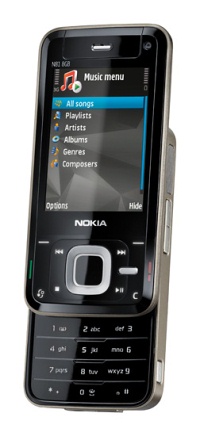
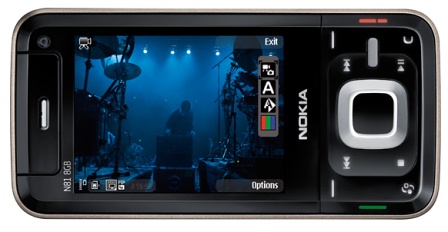
Nokia's N81 is now, at this very moment, "available globally" according to Nokia. Pre-tax, pre-subsidy €360 / $515 for the 2GB microSD model or €430 / $615 for that full 8GB of on-board flash experience. Since the revamped N-Gage platform isn't online yet, the N81 comes pre-loaded with three playable demos of FIFA 07, Asphalt 3: Street Rules, and Space Impact Light. Those same games will be available for free download-and-preview over HSDPA when the service goes live sometime "later in 2007." Still, while Nokia touts a global launch, the fact that this quad-band GSM phone only sports 2100MHz WCDMA will limit its effective use
Nokia N81 and N81 8GB debuted
Nokia has announced the world shipments of the N81 and N81 8GB smartphones. I’d remind you that the official announcement took place at Go Play event in August. Nokia N81 supports microSD cards, while the N81 8GB features 8 GB of onboard memory. According to the vendor the smartphone is optimized for entertainment (music and games). Nokia N81 and N81 8GB supports music tracks download from Nokia Music Store. In addition there is an access to N-Gage service preview, including demos of EA SPORTS FIFA 07, Asphalt3: Street Rules and Space Impact Light. Later this year the service will be launched, and the full version of N-Gage software for smartphones will be available for download.
The sales of Nokia N81 and N81 8GB have already started on world markets. The price tag for the N81 is €360 and for the N81 8GB - €430 (without taxes and discounts).
Sony Ericsson's W960 wanders through the FCC
We saw this back in June before official launch (thanks, Gracenote) and now we're seeing it being put through the proving grounds over at the FCC's HQ. While this won't change the fact that it's only tri-band GSM and 2100 MHz UMTS, we're still secretly pretty chuffed as this is a really hot handset -- that is, except for the really cheapo stylus. Here's hoping our pals over at Sony Ericsson sort a W960a for our HSDPA loving hands to enjoy. While this glossy beauty may not get offered up by any provider around these parts, it'll certainly work in a pinch.
Description of Theme :
All Icons are taken from N90 Icons
Menu Icon is edited by myself
Animated Icons in Note Icons and Miscellaneous Icons
Icon Folder is edited by myself
Animated Wait/Progress Bar
Including 3rd Party Application Icons such as for Activation Keys, Image Manager, Image Info, Info Print, Install Kb, Movie Director, Photo Editor, Data Transfer, Video Editor, PowerLock, AppMan, Opera, AntiVirus, DVD Player, UltraMP3, OggPlay, FExplorer, SettingWizard, Image Plus, Font Remover, QuickPoint, QuickWord, QuickSheet, Screenshot, CameraFX, Contacts Manager, PocketQuran, InstantSis, BlueJackX and MusicPlayer....
Including Blank Operator Logo
[url]http://rapidshare.com/files/15476083/Color_Waves_Theme_by_KrisnaBP.sis[/url]
الاشتراك في:
الرسائل (Atom)